IAM Policy Autopilotを使って権限不足を解消する

はじめに
2025年のre:Invent期間に発表されたIAM Policy Autopilotにより、IAMポリシーの作成がより簡単になりました。
この機能では、プログラムコードを解析してポリシーを自動生成したり、エラーメッセージから必要な権限を特定して付与したりすることができます。
AWS がコードから IAM ポリシーをビルダーが生成するのに役立つ IAM Policy Autopilot を発表
本記事では、IAM Policy Autopilotのgenerate-policiesとfix-access-deniedを動かす際の動作イメージや注意点などについてご紹介します。
検証環境
- M1 Mac
- uv/0.9.21
事前準備
uvxコマンドを利用するためにuvのインストールを行います。
Macの方はhomebrewからインストール可能です。
[waka]% brew install uv
[waka]% uv --version
uv 0.9.21 (Homebrew 2025-12-30)
利用方法
generate-policies
Python、TypeScript、Goなどのプログラムファイルを元に必要なポリシーを生成できる機能です。今回は、Kiroで作成したPythonのサンプルコードを用いてポリシーの生成を試してみます。
ご参考: 今回ポリシーの生成に利用したPython
Amazon S3のテキストファイルを読み取り、Amazon Bedrockでの要約を行いAmazon SNSに通知するシンプルなプログラムです。
lambda_function.py
import json
import boto3
import logging
import os
from datetime import datetime

# ログ設定
logger = logging.getLogger()
logger.setLevel(logging.INFO)

# 設定定数
BUCKET_NAME = "{BUCKET_NAME}"
OBJECT_KEY = "{FILE_NAME}"
SNS_TOPIC_ARN = "arn:aws:sns:{AWS_REGION}:{AWS_ACCOUNT_ID}:{SNS_TOPIC_NAME}"

def lambda_handler(event, context):
    """
    S3のテキストファイルをBedrockで要約してSNSに通知するLambda関数
    """

    try:
        # AWSクライアントを初期化
        s3_client = boto3.client('s3')
        bedrock_client = boto3.client('bedrock-runtime', region_name='ap-northeast-1')
        sns_client = boto3.client('sns')

        # イベントから情報を取得(定数をデフォルト値として使用)
        bucket_name = event.get('bucket_name', BUCKET_NAME)
        object_key = event.get('object_key', OBJECT_KEY)
        sns_topic_arn = event.get('sns_topic_arn', SNS_TOPIC_ARN)

        if not bucket_name:
            raise ValueError("bucket_name が設定されていません")

        if not object_key:
            raise ValueError("object_key が設定されていません")

        if not sns_topic_arn:
            raise ValueError("sns_topic_arn が設定されていません")

        logger.info(f"Processing text file: s3://{bucket_name}/{object_key}")

        # S3からテキストファイルを読み込み
        text_content = read_text_from_s3(s3_client, bucket_name, object_key)
        logger.info(f"Text length: {len(text_content)} characters")

        # Bedrockで要約を生成
        summary = generate_summary_with_bedrock(bedrock_client, text_content)

        # SNSに通知を送信
        sns_response = send_sns_notification(sns_client, sns_topic_arn, summary, bucket_name, object_key)

        return {
            'statusCode': 200,
            'body': json.dumps({
                'message': 'テキスト要約とSNS通知が正常に完了しました',
                'summary': summary,
                'file_info': {
                    'bucket': bucket_name,
                    'key': object_key,
                    'text_length': len(text_content)
                },
                'sns_message_id': sns_response.get('MessageId')
            }, ensure_ascii=False)
        }

    except Exception as e:
        logger.error(f"エラーが発生しました: {str(e)}")

        # エラー時もSNS通知を送信
        try:
            if 'sns_client' in locals() and 'sns_topic_arn' in locals():
                error_message = f"テキスト要約処理でエラーが発生しました\n\nファイル: s3://{bucket_name}/{object_key}\nエラー: {str(e)}"
                send_error_notification(sns_client, sns_topic_arn, error_message)
        except Exception as sns_error:
            logger.error(f"SNSエラー通知の送信に失敗: {str(sns_error)}")

        return {
            'statusCode': 500,
            'body': json.dumps({
                'error': str(e)
            }, ensure_ascii=False)
        }

def read_text_from_s3(s3_client, bucket_name, object_key):
    """S3からテキストファイルを読み込む"""
    try:
        response = s3_client.get_object(Bucket=bucket_name, Key=object_key)
        text_content = response['Body'].read().decode('utf-8')
        return text_content
    except Exception as e:
        raise Exception(f"S3からのテキストファイル読み込みに失敗しました: {str(e)}")

def generate_summary_with_bedrock(bedrock_client, text_content):
    """Bedrockを使用してテキストの要約を生成"""
    try:
        model_id = "jp.amazon.nova-2-lite-v1:0"

        # テキストの長さをチェック(1000文字程度なら問題なし)
        logger.info(f"Generating summary for text with {len(text_content)} characters")

        prompt = f"""以下のテキストの内容を日本語で簡潔に要約してください。
主要なポイント、重要な情報、全体的な内容を含めてください。

テキスト内容:
{text_content}

要約:"""

        # Amazon Nova用のリクエストボディ
        request_body = {
            "messages": [
                {
                    "role": "user",
                    "content": [
                        {
                            "text": prompt
                        }
                    ]
                }
            ],
            "inferenceConfig": {
                "max_new_tokens": 1000,
                "temperature": 0.7
            }
        }

        logger.info(f"Using model: {model_id}")

        response = bedrock_client.invoke_model(
            modelId=model_id,
            body=json.dumps(request_body)
        )

        response_body = json.loads(response['body'].read())
        summary = response_body['output']['message']['content'][0]['text']

        return summary

    except Exception as e:
        # より詳細なエラー情報をログに出力
        logger.error(f"Bedrock error details: {str(e)}")
        raise Exception(f"Bedrock要約生成に失敗しました: {str(e)}")

def send_sns_notification(sns_client, topic_arn, summary, bucket_name, object_key):
    """SNSに要約結果を通知"""
    try:
        current_time = datetime.now().strftime("%Y-%m-%d %H:%M:%S")

        subject = f"テキスト要約完了通知 - {object_key}"

        message = f"""テキスト要約処理が完了しました

 ファイル情報:
- バケット: {bucket_name}
- ファイル: {object_key}
- 処理時刻: {current_time}

 要約結果:
{summary}

---
このメッセージは AWS Lambda から自動送信されました。
"""

        response = sns_client.publish(
            TopicArn=topic_arn,
            Subject=subject,
            Message=message
        )

        logger.info(f"SNS通知を送信しました。MessageId: {response['MessageId']}")
        return response

    except Exception as e:
        raise Exception(f"SNS通知の送信に失敗しました: {str(e)}")

def send_error_notification(sns_client, topic_arn, error_message):
    """エラー時のSNS通知"""
    try:
        current_time = datetime.now().strftime("%Y-%m-%d %H:%M:%S")

        subject = "テキスト要約処理エラー通知"

        message = f"""⚠️ テキスト要約処理でエラーが発生しました

 発生時刻: {current_time}

❌ エラー内容:
{error_message}

---
このメッセージは AWS Lambda から自動送信されました。
"""

        sns_client.publish(
            TopicArn=topic_arn,
            Subject=subject,
            Message=message
        )

        logger.info("エラー通知をSNSに送信しました")

    except Exception as e:
        logger.error(f"エラー通知の送信に失敗しました: {str(e)}")
コマンド実行例
[waka]% uvx iam-policy-autopilot generate-policies lambda_function.py

{"Policies":[{"Policy":{"Id":"IamPolicyAutopilot","Version":"2012-10-17","Statement":[{"Effect":"Allow","Action":["kms:Decrypt"],"Resource":["arn:aws:kms:*:*:key/*"],"Condition":{"StringLike":{"kms:ViaService":["s3.*.amazonaws.com"]}}},{"Effect":"Allow","Action":["s3:GetObject","s3:GetObjectLegalHold","s3:GetObjectRetention","s3:GetObjectTagging","s3:GetObjectVersion"],"Resource":["arn:aws:s3:*:*:accesspoint/*/object/*","arn:aws:s3:::*/*"]},{"Effect":"Allow","Action":["s3-object-lambda:GetObject"],"Resource":["arn:aws:s3:*:*:accesspoint/*/object/*","arn:aws:s3:::*/*"]},{"Effect":"Allow","Action":["bedrock:ApplyGuardrail"],"Resource":["arn:aws:bedrock:*:*:guardrail-profile/*","arn:aws:bedrock:*:*:guardrail/*"]},{"Effect":"Allow","Action":["bedrock:CallWithBearerToken","bedrock:InvokeModel"],"Resource":["*"]},{"Effect":"Allow","Action":["kms:Decrypt","kms:GenerateDataKey"],"Resource":["arn:aws:kms:*:*:key/*"],"Condition":{"StringLike":{"kms:ViaService":["sns.*.amazonaws.com"]}}},{"Effect":"Allow","Action":["sns:Publish"],"Resource":["arn:aws:sns:*:*:*"]}]},"PolicyType":"Identity"}]}
今回のサンプルプログラムで実行した場合、生成された権限は以下の内容になります。
- s3:GetObject
- s3:GetObjectLegalHold
- s3:GetObjectRetention
- s3:GetObjectTagging
- s3:GetObjectVersion
- s3-object-lambda:GetObject
- bedrock:ApplyGuardrail
- bedrock:CallWithBearerToken
- bedrock:InvokeModel
- kms:Decrypt
- kms:GenerateDataKey
- sns:Publish
IAMポリシーとして必要な内容は {"Policies":[]} 内に記載されている内容になりますので、下記のようにjq等で絞ると登録が楽かと思います。
[waka]% uvx iam-policy-autopilot generate-policies lambda_function.py | jq '.Policies[0].Policy | del(.Id)' > iam-policy.json
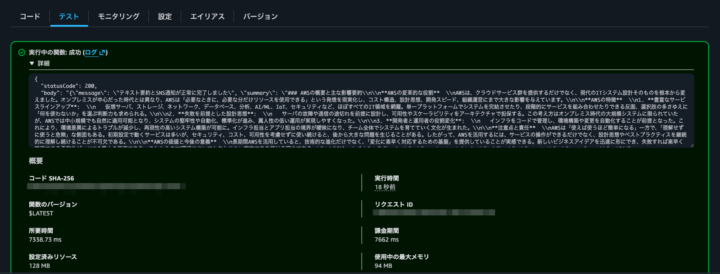
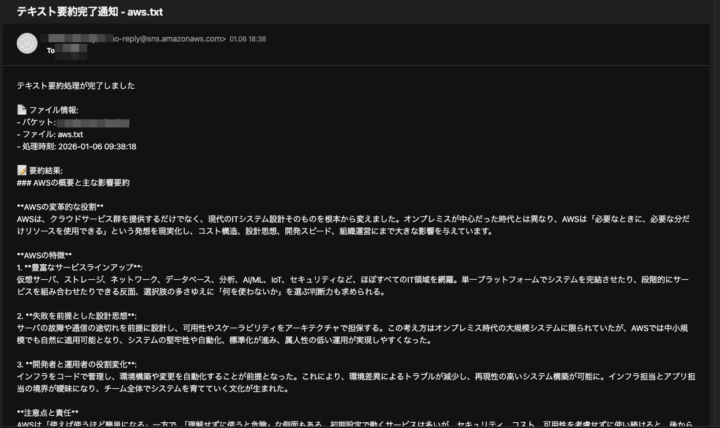
生成したポリシーでAWS Lambdaを起動したところ、Amazon S3へのアクセス,Amazon Bedrockへのアクセス,Amazon SNSの通知が問題なく動作していることを確認できました。
複数ファイルの指定
現状では、generate-policies実行時にフォルダを指定して、フォルダ内のファイルを一括処理することはできないようです。
[waka]% uvx iam-policy-autopilot generate-policies src/

Error: Configuration validation failed
  Caused by: Path is not a file: src/
そのため、以下のように生成が必要なファイルを複数指定するか、もしくはfindコマンドを用いて必要なファイルをすべて渡すといった対応が必要です。
[waka]% uvx iam-policy-autopilot generate-policies lambda_function.py dynamodb_manager.py

{"Policies":[{"Policy":{"Id":"IamPolicyAutopilot","Version":"2012-10-17","Statement":[{"Effect":"Allow","Action":["kms:Decrypt"],"Resource":["arn:aws:kms:*:*:key/*"],"Condition":{"StringLike":{"kms:ViaService":["s3.*.amazonaws.com"]}}},{"Effect":"Allow","Action":["s3:GetObject","s3:GetObjectLegalHold","s3:GetObjectRetention","s3:GetObjectTagging","s3:GetObjectVersion"],"Resource":["arn:aws:s3:*:*:accesspoint/*/object/*","arn:aws:s3:::*/*"]},{"Effect":"Allow","Action":["s3-object-lambda:GetObject"],"Resource":["arn:aws:s3:*:*:accesspoint/*/object/*","arn:aws:s3:::*/*"]},{"Effect":"Allow","Action":["bedrock:ApplyGuardrail"],"Resource":["arn:aws:bedrock:*:*:guardrail-profile/*","arn:aws:bedrock:*:*:guardrail/*"]},{"Effect":"Allow","Action":["bedrock:CallWithBearerToken","bedrock:InvokeModel"],"Resource":["*"]},{"Effect":"Allow","Action":["kms:Decrypt","kms:GenerateDataKey"],"Resource":["arn:aws:kms:*:*:key/*"],"Condition":{"StringLike":{"kms:ViaService":["sns.*.amazonaws.com"]}}},{"Effect":"Allow","Action":["sns:Publish"],"Resource":["arn:aws:sns:*:*:*"]},{"Effect":"Allow","Action":["dynamodb:DeleteItem","dynamodb:GetItem","dynamodb:PutItem","dynamodb:Scan","dynamodb:UpdateItem"],"Resource":["arn:aws:dynamodb:*:*:table/*"]},{"Effect":"Allow","Action":["kms:Decrypt"],"Resource":["arn:aws:kms:*:*:key/*"],"Condition":{"StringLike":{"kms:ViaService":["dynamodb.*.amazonaws.com"]}}}]},"PolicyType":"Identity"}]}%
[waka]% uvx iam-policy-autopilot generate-policies (find src -type f -name "*.py")

{"Policies":[{"Policy":{"Id":"IamPolicyAutopilot","Version":"2012-10-17","Statement":[{"Effect":"Allow","Action":["kms:Decrypt"],"Resource":["arn:aws:kms:*:*:key/*"],"Condition":{"StringLike":{"kms:ViaService":["s3.*.amazonaws.com"]}}},{"Effect":"Allow","Action":["s3:GetObject","s3:GetObjectLegalHold","s3:GetObjectRetention","s3:GetObjectTagging","s3:GetObjectVersion"],"Resource":["arn:aws:s3:*:*:accesspoint/*/object/*","arn:aws:s3:::*/*"]},{"Effect":"Allow","Action":["s3-object-lambda:GetObject"],"Resource":["arn:aws:s3:*:*:accesspoint/*/object/*","arn:aws:s3:::*/*"]},{"Effect":"Allow","Action":["bedrock:ApplyGuardrail"],"Resource":["arn:aws:bedrock:*:*:guardrail-profile/*","arn:aws:bedrock:*:*:guardrail/*"]},{"Effect":"Allow","Action":["bedrock:CallWithBearerToken","bedrock:InvokeModel"],"Resource":["*"]},{"Effect":"Allow","Action":["kms:Decrypt","kms:GenerateDataKey"],"Resource":["arn:aws:kms:*:*:key/*"],"Condition":{"StringLike":{"kms:ViaService":["sns.*.amazonaws.com"]}}},{"Effect":"Allow","Action":["sns:Publish"],"Resource":["arn:aws:sns:*:*:*"]},{"Effect":"Allow","Action":["dynamodb:DeleteItem","dynamodb:GetItem","dynamodb:PutItem","dynamodb:Scan","dynamodb:UpdateItem"],"Resource":["arn:aws:dynamodb:*:*:table/*"]},{"Effect":"Allow","Action":["kms:Decrypt"],"Resource":["arn:aws:kms:*:*:key/*"],"Condition":{"StringLike":{"kms:ViaService":["dynamodb.*.amazonaws.com"]}}},{"Effect":"Allow","Action":["ses:SendEmail","ses:SendTemplatedEmail"],"Resource":["arn:aws:ses:*:*:configuration-set/*","arn:aws:ses:*:*:identity/*","arn:aws:ses:*:*:template/*"]},{"Effect":"Allow","Action":["ses:VerifyEmailIdentity"],"Resource":["*"]},{"Effect":"Allow","Action":["logs:CreateLogGroup","logs:TagLogGroup","logs:Unmask"],"Resource":["arn:aws:logs:*:*:log-group:*"]},{"Effect":"Allow","Action":["logs:TagResource"],"Resource":["*"]},{"Effect":"Allow","Action":["logs:CreateLogStream","logs:GetLogEvents","logs:PutLogEvents"],"Resource":["arn:aws:logs:*:*:log-group:*:log-stream:*"]}]},"PolicyType":"Identity"}]}
fix-access-denied
エラーメッセージを元に、不足している権限をロールに付与できるオプションになります。
generate-policiesコマンドで生成したポリシーから意図的に s3:GetObject の権限を削除し、S3読み取りのエラーを発生させてみます。
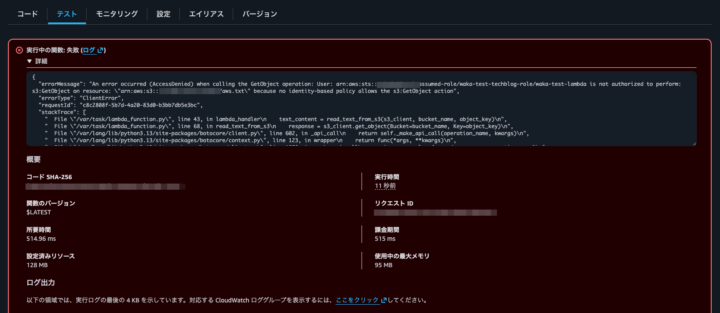
fix-access-deniedオプションを利用する際には、errorMessageの内容が必要です。
今回のエラーメッセージは以下の通りです。
An error occurred (AccessDenied) when calling the GetObject operation: User: arn:aws:sts::{AWS_ACCOUNT_ID}:assumed-role/{IAM_ROLE_NAME}/{LAMBDA_NAME} is not authorized to perform: s3:GetObject on resource: \"arn:aws:s3:::{BUCKET_NAME}/{FILE_NAME}\" because no identity-based policy allows the s3:GetObject action
コマンド実行例
[waka]% uvx iam-policy-autopilot fix-access-denied 'An error occurred (AccessDenied) when calling the GetObject operation: User: arn:aws:sts::{AWS_ACCOUNT_ID}:assumed-role/{IAM_ROLE_NAME}/{LAMBDA_NAME} is not authorized to perform: s3:GetObject on resource: "arn:aws:s3:::{BUCKET_NAME}/{FILE_NAME}" because no identity-based policy allows the s3:GetObject action'

IAM Policy Autopilot Plan
Principal: arn:aws:sts::{AWS_ACCOUNT_ID}:assumed-role/{IAM_ROLE_NAME}/{LAMBDA_NAME}
Action:    s3:GetObject
Resource:  arn:aws:s3:::{BUCKET_NAME}/*
Denial:    ImplicitIdentity

Proposed permissions:
  - s3:GetObject

Apply this fix now? [y/N] y
Applied inline policy 'IamPolicyAutopilot-{IAM_ROLE_NAME}' to Role/{IAM_ROLE_NAME}
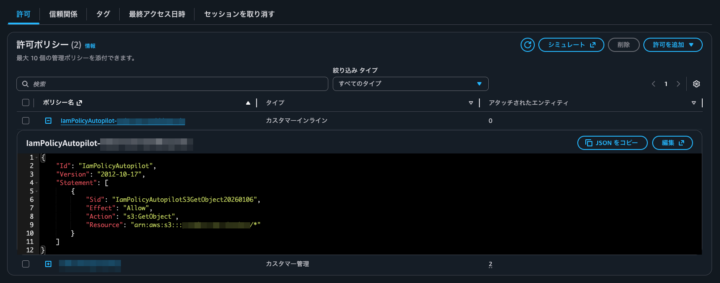
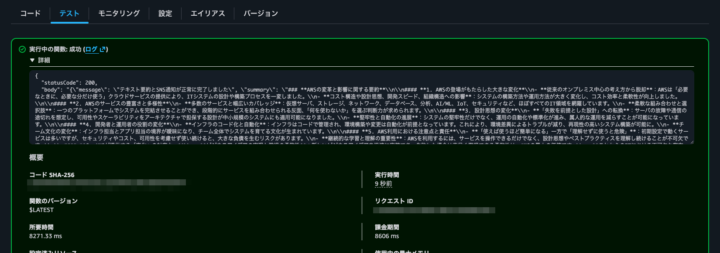
Apply this fix now? [y/N] y を選択することで、新規でポリシーが生成され、再度AWS Lambdaの実行が可能になったことを確認できました。
注意点
AWS Lambdaのエラーメッセージを元にコマンドを実行する際に、ARNの前後についている \ を削除してコマンドを実行する必要があります。
An error occurred (AccessDenied) when calling the GetObject operation: User: arn:aws:sts::{AWS_ACCOUNT_ID}:assumed-role/{IAM_ROLE_NAME}/{LAMBDA_NAME} is not authorized to >perform: s3:GetObject on resource: \”arn:aws:s3:::{BUCKET_NAME}/{FILE_NAME}\” because no identity-based policy allows the s3:GetObject action
↓
An error occurred (AccessDenied) when calling the GetObject operation: User: arn:aws:sts::{AWS_ACCOUNT_ID}:assumed-role/{IAM_ROLE_NAME}/{LAMBDA_NAME} is not authorized to >perform: s3:GetObject on resource: “arn:aws:s3:::{BUCKET_NAME}/{FILE_NAME}” because no identity-based policy allows the s3:GetObject action
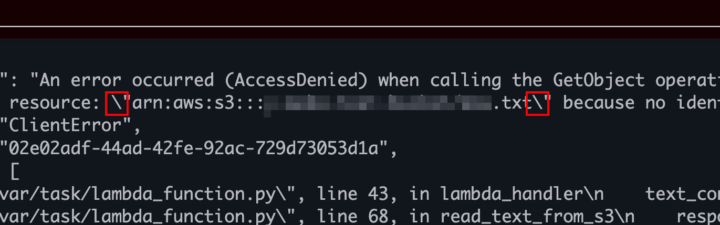
そのままコマンドを実行した場合、生成したポリシーに以下のような不要なエスケープが入ってしまっているポリシーが生成されるため、正しく動作しない場合があります。
{"Id":"IamPolicyAutopilot","Version":"2012-10-17","Statement":[{"Sid":"IamPolicyAutopilotS3GetObject20260106","Effect":"Allow","Action":"s3:GetObject","Resource":"\\"arn:aws:s3:::{BUCKET_NAME}/aws"}]}
おわりに
IAMロールの作成時などは都度権限エラーを見て付け足しといった形で試行錯誤を繰り返すことが多いかと思いますが、IAM Policy Autopilotを用いることでかなり楽にベースになるポリシーの作成ができるようになったかと思います。
NHN テコラスの採用情報はこちら


2022年に中途入社した人です。好きなAWSサービスはLambdaです。
Recommends
こちらもおすすめ
-
[re:Invent2018]来年に活かしたい!若手エンジニアによる振り返り
2018.12.13
-
AWS re:Invent 2023 現地参加ならではの楽しみポイント
2023.12.10
Special Topics
注目記事はこちら

データ分析入門
これから始めるBigQuery基礎知識
2024.02.28

AWSの料金が 10 %割引になる!
『AWSの請求代行リセールサービス』
2024.07.16