【Amazon Quick】Google Cloud の Developer Knowledge API と連携しよう

はじめに
こんにちは、Paseri です。
Amazon Quick では外部の API などとマネージドに MCP(Model Context Protocol)やインテグレーションと連携することができます。
ですが、一部の API 等ではまだ Quick に対応していないものがあります。
そのような API でも AgentCore を介すことで MCP サーバーとして利用することができます。
その一例として今回は、Google から提供されている Developer Knowledge API を呼び出す MCP サーバーを、Quick と連携する方法をご紹介します。
以前の記事でも、AgentCore Runtime にデプロイしたエージェントを Gateway 経由で Quick と連携する構成を紹介しました。
【Amazon Quick】Amazon Bedrock AgentCore のエージェントと連携してみる | NHN テコラス Tech Blog
今回は Runtime を使わず、Gateway + Lambda のシンプルな構成で Google Cloud のドキュメント検索機能を Quick に統合します。
AgentCore Gateway や Quick との連携手順は、前回の記事と共通する部分が多いため本記事では差分となるポイントに絞って解説していきます。
Developer Knowledge API とは?
Developer Knowledge API は、Google が公開している開発者向けドキュメントにプログラムからアクセスするための API です。
Firebase、Google Cloud、Android など Google の公式ドキュメントを検索することができます。
またこの API では MCP サーバーも提供されており、ユーザーの IDE や CLI などのツールから公式ドキュメントの最新の情報に基づいた回答を受けることができます。
- Developer Knowledge API | Google for Developers
- Developer Knowledge MCP サーバーに接続する | Google for Developers
主な機能
API は大きく 2 つの機能を提供しています。
| No | 機能 | 説明 |
|---|---|---|
| 1 | SearchDocumentChunks | 自然言語クエリでドキュメントを検索し、関連するページの URI とスニペットを返す |
| 2 | GetDocument / BatchGetDocuments | 検索結果のリソース名を使って、ドキュメントの全文を Markdown で取得 |
API Key の発行
Developer Knowledge API を利用するには、Google Cloud プロジェクトで API を有効化し、API Key を発行する必要があります。
1.Google Cloud Shell または CLI で API を有効化します。
gcloud services enable developerknowledge.googleapis.com
2.API Key を作成します。
gcloud services api-keys create --display-name="Developer Knowledge API Key"
コマンドを実行すると、keyString に API Key の値が出力されます。
この値は、後ほど必要になるので控えておきましょう。
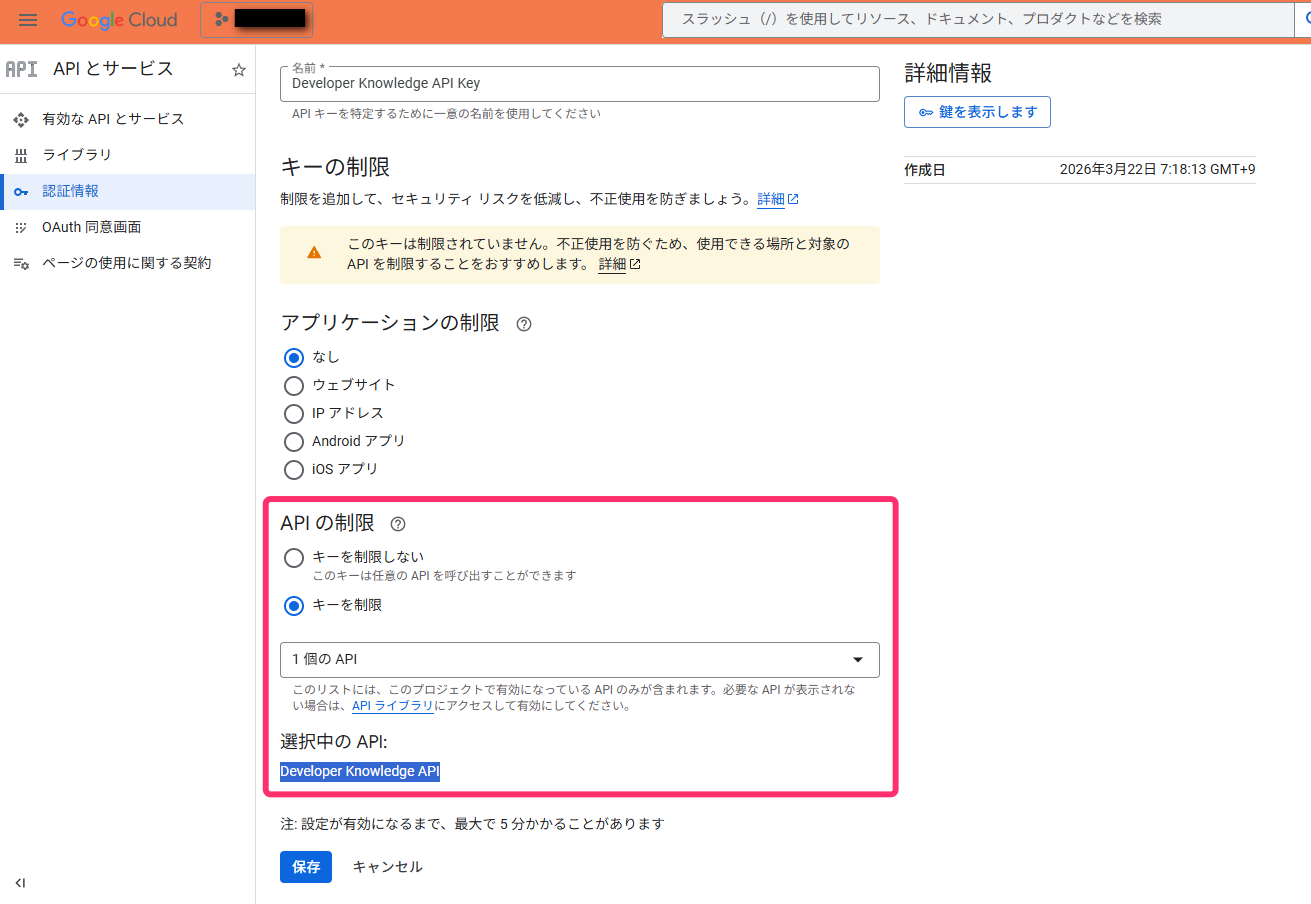
3.Google Cloud コンソールの「認証情報」ページから、作成した API Key に制限をかけておきます。
「API の制限」で「キーを制限」を選択し、Developer Knowledge API のみを許可する設定にします。
4.API Key を有効化します。
gcloud beta services mcp enable developerknowledge.googleapis.com
これで API Key の準備は完了です。
この Key を後ほど CloudFormation のパラメーターとして使用します。
CloudFormation デプロイ
ここからは AWS の操作になります。
AgentCore Gateway 等の Quick との連携に必要なリソースは CloudFormation で作成します。
ここは以前のブログと同様の操作になるため、重要なポイントに絞ってご紹介します。
CloudFormation テンプレートの準備
テンプレートには以下のリソースが定義されています。(コードは本記事の下部に添付しています。)
前回との大きな違いは Lambda 関数の中身です。
前回は AgentCore Runtime へリクエストを転送するプロキシーとして構築しましたが、今回は Lambda の中に MCP ツールの処理を直接実装しています。
AgentCore Gateway にツールのスキーマを定義することで、Lambda を MCP サーバーとして動作させることができます。
- Cognito ユーザープール(OAuth 認証用)
- Cognito ユーザープールドメイン
- Cognito ユーザープールクライアント
- Lambda 関数(Developer Knowledge API 呼び出し用)
- Lambda 実行ロール
- AgentCore Gateway
- Gateway Target
- Gateway 実行ロール
スタックの作成
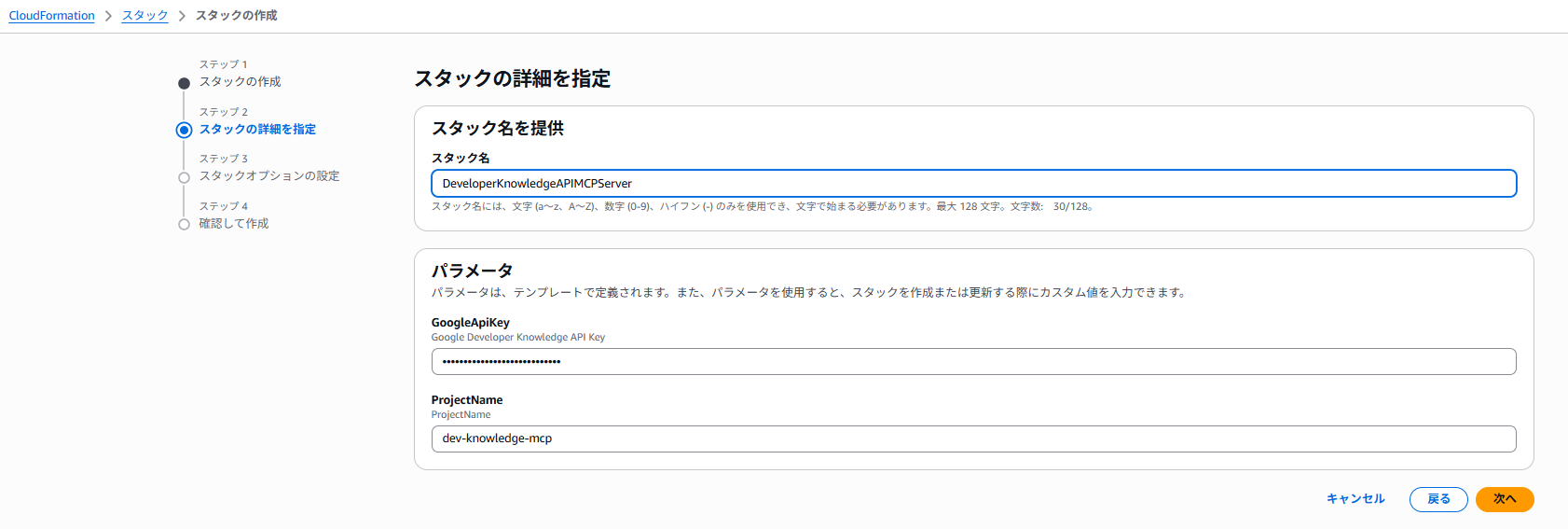
CloudFormation コンソールからスタックを作成します。
GoogleApiKey パラメーターに、先ほど取得した API Key の値を入力します。
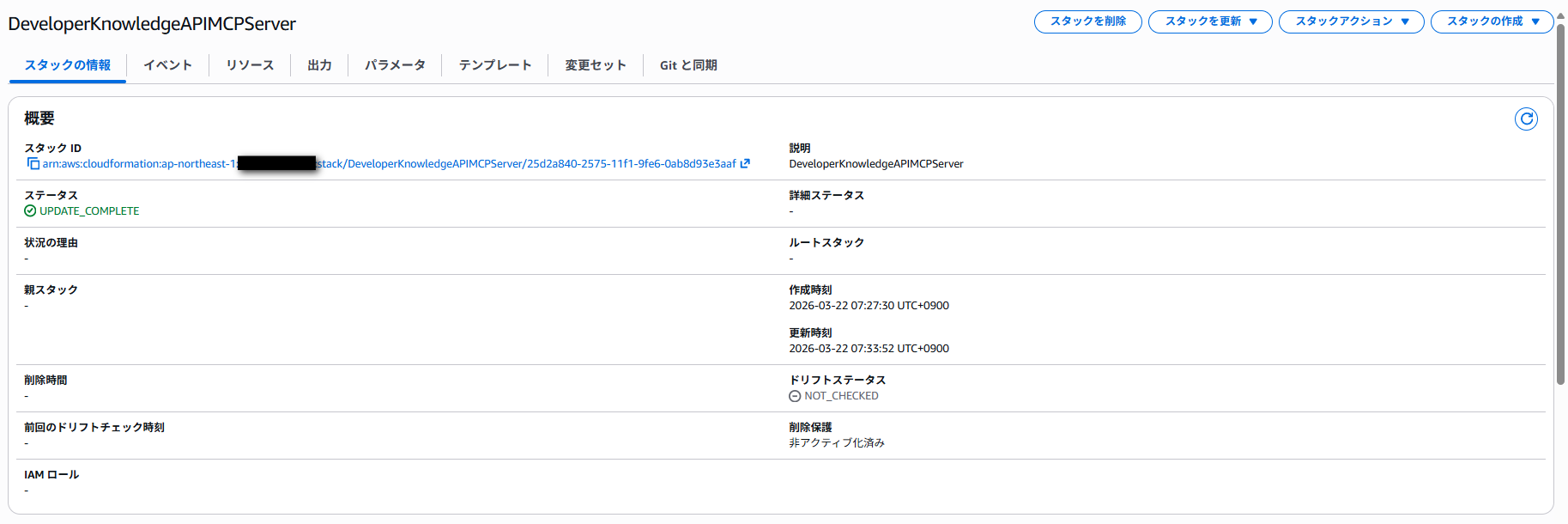
エラー無く作成できれば完了です。
Quick と連携
ここの手順も、以前の記事とほとんど同じ操作になるため割愛します。
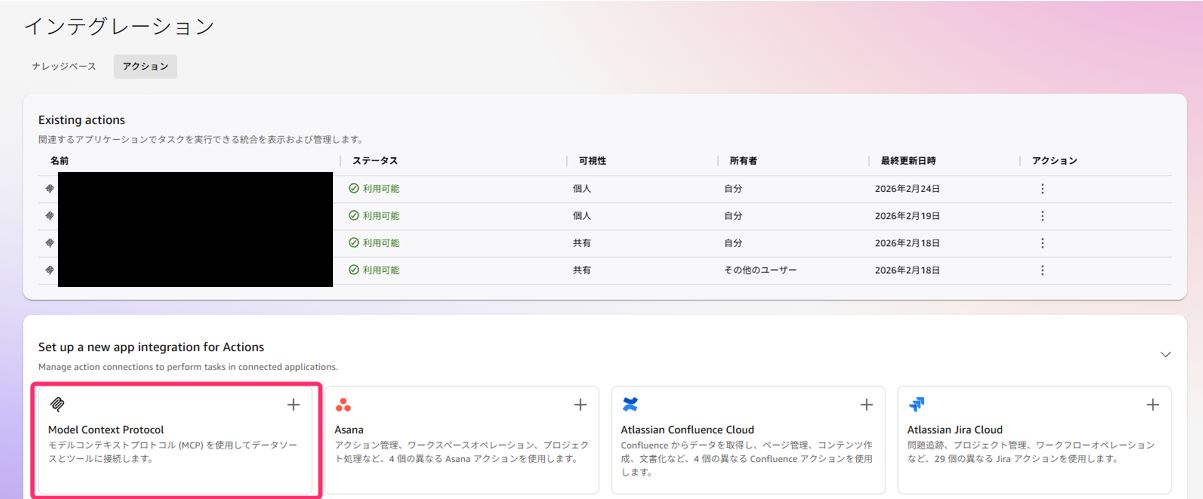
Quick のインテグレーションから「Model Context Protocol」を選択して MCP の統合を設定します。
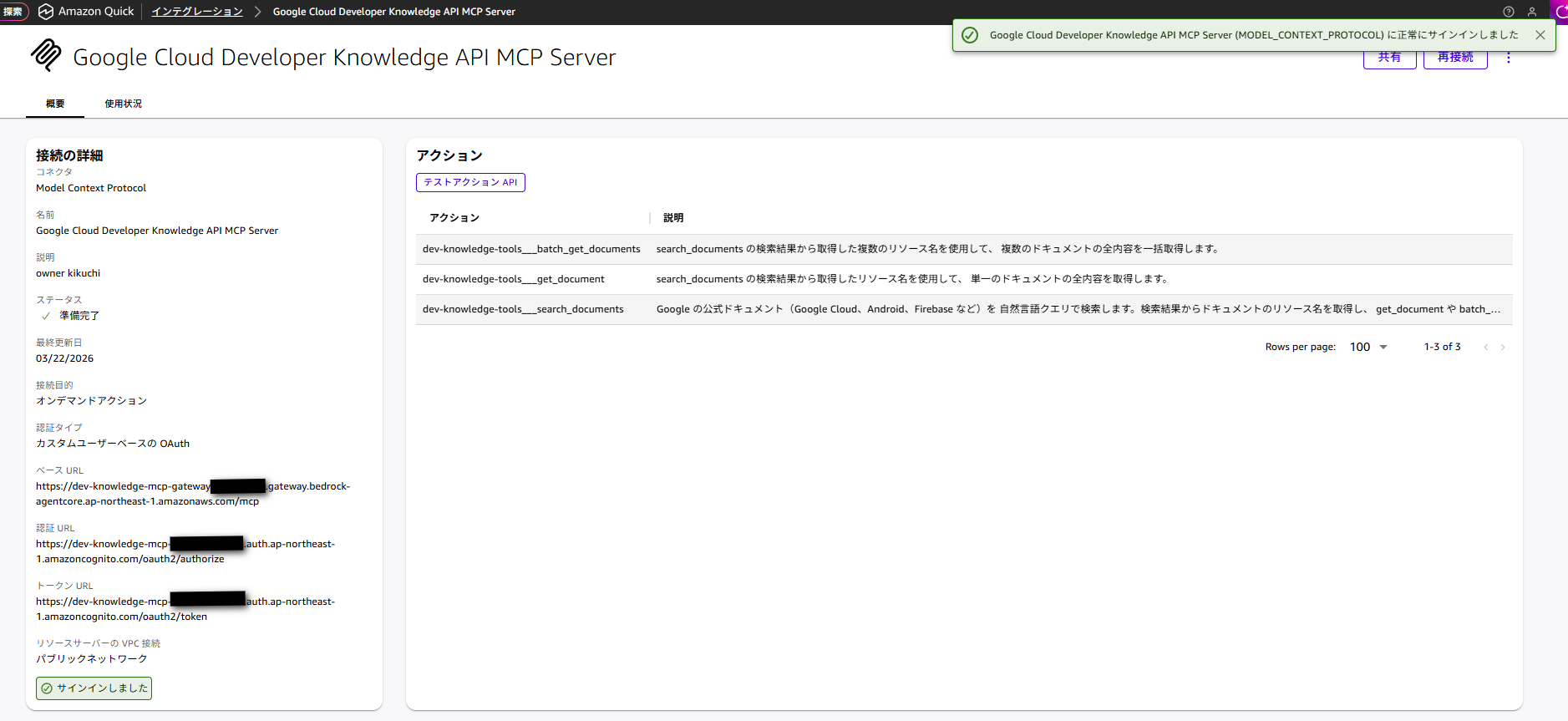
各種パラメーターは CloudFormation の Outputs から確認できます。
認証が完了すると、Quick 上で Developer Knowledge API のツールが有効になります。
実行してみる
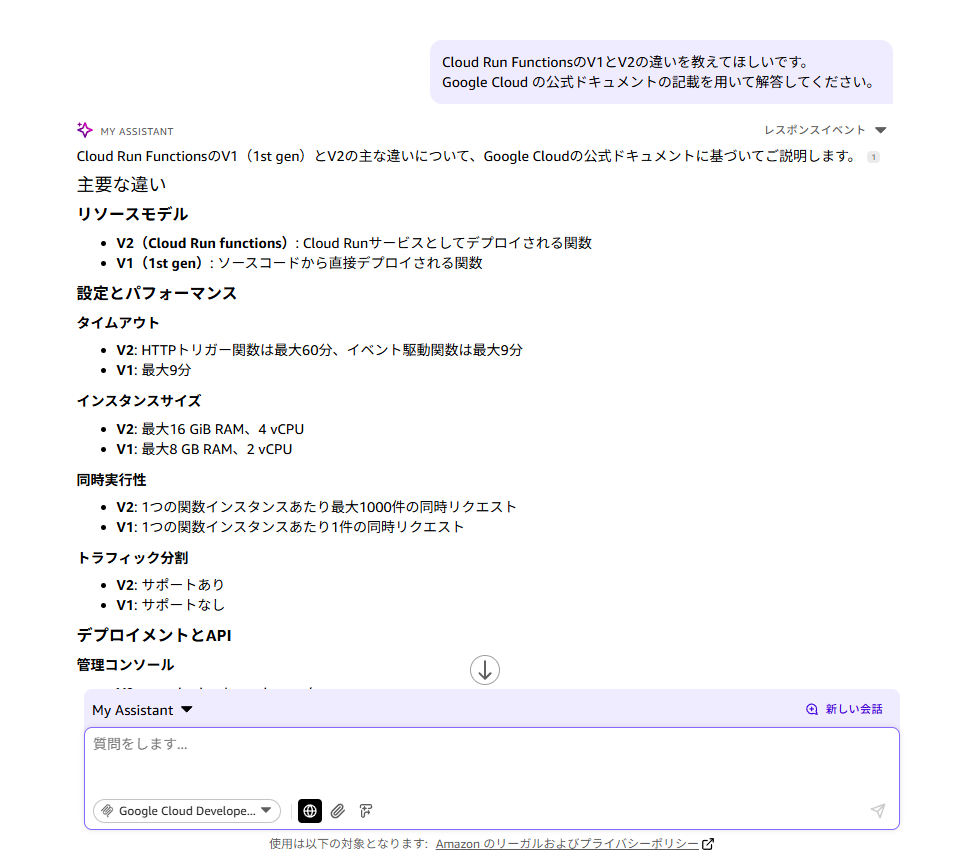
設定が完了したので、Quick のチャットから Google Cloud のドキュメントを検索してみます。
Google Cloud に関する質問を投げることで、Developer Knowledge API を通じて公式ドキュメントから情報を取得して回答してくれました。
Cloud Run Function の V1 と V2 の違いを教えてほしいです。
Google Cloud の公式ドキュメントの記載を用いて解答してください。
まとめ
今回は、Google の Developer Knowledge API を呼び出す MCP ツールを Lambda 上に自前で実装し、AgentCore Gateway 経由で Amazon Quick と連携する方法を紹介しました。
Amazon Quick がマネージドでサポートしていない MCP やインテグレーションであっても、AgentCore Gateway + Lambda の構成を使うことで MCP サーバーとして自前で実装することで、Quick に組み込むことができます。
AgentCore Gateway にツールスキーマを定義することで Lambda を MCP サーバーとして動作させる仕組みのため、バックエンドの実装を問わず Quick と統合できる柔軟な構成になっています。
この仕組みを活用することで、他にも様々な外部 API を MCP サーバーとして構築し、Quick と連携することができそうです。
また、Developer Knowledge API を活用することで、Google Cloud や Firebase、Android などの Google の公式ドキュメントを Quick のチャットから直接検索できるようになります。
マルチクラウド環境での情報収集や、Google Cloud サービスの調査に活用できそうです。
少しでも参考になれば幸いです!
最後までお読み頂きありがとうございました!
Appendix
今回の構築に利用した CloudFormation テンプレートです。
AWSTemplateFormatVersion: "2010-09-09"
Description: DeveloperKnowledgeAPIMCPServer

Parameters:
  GoogleApiKey:
    Type: String
    NoEcho: true
    Description: Google Developer Knowledge API Key
  ProjectName:
    Type: String
    Default: dev-knowledge-mcp
    Description: ProjectName

Resources:
  # Cognito ユーザープール
  UserPool:
    Type: AWS::Cognito::UserPool
    Properties:
      UserPoolName: !Sub "${ProjectName}-user-pool"
      UsernameAttributes:
        - email
      AutoVerifiedAttributes:
        - email
      Policies:
        PasswordPolicy:
          MinimumLength: 8
          RequireUppercase: true
          RequireLowercase: true
          RequireNumbers: true
          RequireSymbols: true
          TemporaryPasswordValidityDays: 7
      AccountRecoverySetting:
        RecoveryMechanisms:
          - Name: verified_email
            Priority: 1

  # Cognito ユーザープールドメイン
  UserPoolDomain:
    Type: AWS::Cognito::UserPoolDomain
    Properties:
      Domain: !Sub "${ProjectName}-${AWS::AccountId}"
      UserPoolId: !Ref UserPool

  # Cognito ユーザープールクライアント(Authorization Code Grant)
  UserPoolClient:
    Type: AWS::Cognito::UserPoolClient
    Properties:
      ClientName: !Sub "${ProjectName}-client"
      UserPoolId: !Ref UserPool
      GenerateSecret: true
      AllowedOAuthFlowsUserPoolClient: true
      AllowedOAuthFlows:
        - code
      AllowedOAuthScopes:
        - email
        - openid
        - profile
      CallbackURLs:
        - "https://us-east-1.quicksight.aws.amazon.com/sn/oauthcallback"
        - "https://us-west-2.quicksight.aws.amazon.com/sn/oauthcallback"
        - "https://ap-northeast-1.quicksight.aws.amazon.com/sn/oauthcallback"
        - "http://localhost:8080/callback"
      LogoutURLs:
        - "https://us-east-1.quicksight.aws.amazon.com/sn/logout"
        - "https://us-west-2.quicksight.aws.amazon.com/sn/logout"
        - "https://ap-northeast-1.quicksight.aws.amazon.com/sn/logout"
        - "http://localhost:8080/logout"
      SupportedIdentityProviders:
        - COGNITO
      PreventUserExistenceErrors: ENABLED
      AccessTokenValidity: 1
      IdTokenValidity: 1
      RefreshTokenValidity: 30

  # Lambda 実行ロール
  LambdaExecutionRole:
    Type: AWS::IAM::Role
    Properties:
      RoleName: !Sub "${ProjectName}-lambda-role"
      AssumeRolePolicyDocument:
        Version: "2012-10-17"
        Statement:
          - Effect: Allow
            Principal:
              Service: lambda.amazonaws.com
            Action: sts:AssumeRole
      ManagedPolicyArns:
        - arn:aws:iam::aws:policy/service-role/AWSLambdaBasicExecutionRole

  # Lambda 関数(Developer Knowledge API を呼び出す)
  DevKnowledgeFunction:
    Type: AWS::Lambda::Function
    Properties:
      FunctionName: !Sub "${ProjectName}-handler"
      Runtime: python3.12
      Handler: index.lambda_handler
      Role: !GetAtt LambdaExecutionRole.Arn
      Timeout: 30
      MemorySize: 256
      Environment:
        Variables:
          GOOGLE_API_KEY: !Ref GoogleApiKey
      Code:
        ZipFile: |
          import json
          import os
          import logging
          from urllib import request, error, parse

          logger = logging.getLogger()
          logger.setLevel(logging.INFO)

          API_KEY = os.environ.get('GOOGLE_API_KEY', '')
          BASE_URL = 'https://developerknowledge.googleapis.com/v1alpha'


          def call_api(method, path, query_params=None):
              """Developer Knowledge API を呼び出す共通関数"""
              url = f'{BASE_URL}{path}'
              params = {'key': API_KEY}
              if query_params:
                  params.update(query_params)
              url += '?' + parse.urlencode(params)

              req = request.Request(url, method=method)

              try:
                  with request.urlopen(req) as resp:
                      return json.loads(resp.read().decode('utf-8'))
              except error.HTTPError as e:
                  error_body = e.read().decode('utf-8')
                  logger.error(f'API error {e.code}: {error_body}')
                  raise Exception(f'Developer Knowledge API error ({e.code}): {error_body}')
              except error.URLError as e:
                  logger.error(f'URL error: {e.reason}')
                  raise Exception(f'Developer Knowledge API connection error: {e.reason}')


          def search_documents(query):
              """ドキュメントを検索する"""
              logger.info(f'search_documents: query={query}')
              result = call_api('GET', '/documents:searchDocumentChunks', {'query': query})

              formatted = []
              for r in result.get('results', []):
                  formatted.append({
                      'parent': r.get('parent', ''),
                      'id': r.get('id', ''),
                      'content': r.get('content', '')[:500]
                  })

              return {
                  'message': f"'{query}' の検索結果: {len(formatted)} 件",
                  'results': formatted
              }


          def get_document(name):
              """単一ドキュメントの全内容を取得する"""
              logger.info(f'get_document: name={name}')
              encoded_name = parse.quote(name, safe='/')
              result = call_api('GET', f'/{encoded_name}')

              return {
                  'name': result.get('name', ''),
                  'uri': result.get('uri', ''),
                  'description': result.get('description', ''),
                  'content': result.get('content', '')
              }


          def batch_get_documents(names):
              """複数ドキュメントの全内容を取得する"""
              logger.info(f'batch_get_documents: names={names}')
              # 複数 names パラメータを手動構築
              names_query = '&'.join(f'names={parse.quote(n, safe="/")}' for n in names)
              url = f'{BASE_URL}/documents:batchGet?key={API_KEY}&{names_query}'
              req = request.Request(url, method='GET')

              try:
                  with request.urlopen(req) as resp:
                      result = json.loads(resp.read().decode('utf-8'))
              except error.HTTPError as e:
                  error_body = e.read().decode('utf-8')
                  logger.error(f'API error {e.code}: {error_body}')
                  raise Exception(f'Developer Knowledge API error ({e.code}): {error_body}')

              documents = []
              for doc in result.get('documents', []):
                  documents.append({
                      'name': doc.get('name', ''),
                      'uri': doc.get('uri', ''),
                      'description': doc.get('description', ''),
                      'content': doc.get('content', '')
                  })

              return {
                  'message': f'{len(documents)} 件のドキュメントを取得しました',
                  'documents': documents
              }


          def lambda_handler(event, context):
              """Lambda ハンドラー"""
              try:
                  logger.info(f'Received event: {json.dumps(event)}')

                  query = event.get('query', '')
                  name = event.get('name', '')
                  names = event.get('names', [])

                  if name:
                      result = get_document(name)
                  elif names:
                      result = batch_get_documents(names)
                  elif query:
                      result = search_documents(query)
                  else:
                      result = {
                          'error': 'query, name, names のいずれかを指定してください'
                      }

                  return result

              except Exception as e:
                  logger.error(f'Error: {str(e)}', exc_info=True)
                  return {'error': str(e)}

  # Lambda リソースベースポリシー(Gateway からの呼び出しを許可)
  LambdaInvokePermission:
    Type: AWS::Lambda::Permission
    Properties:
      FunctionName: !GetAtt DevKnowledgeFunction.Arn
      Action: lambda:InvokeFunction
      Principal: bedrock-agentcore.amazonaws.com
      SourceAccount: !Ref AWS::AccountId

  # Gateway 実行ロール
  GatewayExecutionRole:
    Type: AWS::IAM::Role
    Properties:
      RoleName: !Sub "${ProjectName}-gateway-role"
      AssumeRolePolicyDocument:
        Version: "2012-10-17"
        Statement:
          - Effect: Allow
            Principal:
              Service: bedrock-agentcore.amazonaws.com
            Action: sts:AssumeRole
      Policies:
        - PolicyName: InvokeLambdaPolicy
          PolicyDocument:
            Version: "2012-10-17"
            Statement:
              - Effect: Allow
                Action: lambda:InvokeFunction
                Resource: !GetAtt DevKnowledgeFunction.Arn

  # AgentCore Gateway
  MCPGateway:
    Type: AWS::BedrockAgentCore::Gateway
    Properties:
      Name: !Sub "${ProjectName}-gateway"
      ProtocolType: MCP
      AuthorizerType: CUSTOM_JWT
      RoleArn: !GetAtt GatewayExecutionRole.Arn
      AuthorizerConfiguration:
        CustomJWTAuthorizer:
          DiscoveryUrl: !Sub "https://cognito-idp.${AWS::Region}.amazonaws.com/${UserPool}/.well-known/openid-configuration"
          AllowedClients:
            - !Ref UserPoolClient

  # Gateway ターゲット(3つのツールを定義)
  GatewayTarget:
    Type: AWS::BedrockAgentCore::GatewayTarget
    Properties:
      GatewayIdentifier: !Ref MCPGateway
      Name: dev-knowledge-tools
      Description: Google Developer Knowledge API を使用したドキュメント検索ツール
      TargetConfiguration:
        Mcp:
          Lambda:
            LambdaArn: !GetAtt DevKnowledgeFunction.Arn
            ToolSchema:
              InlinePayload:
                - Name: search_documents
                  Description: >
                    Google の公式ドキュメント(Google Cloud、Android、Firebase など)を
                    自然言語クエリで検索します。検索結果からドキュメントのリソース名を取得し、
                    get_document や batch_get_documents で全文を取得できます。
                  InputSchema:
                    Type: object
                    Properties:
                      query:
                        Type: string
                        Description: 検索クエリ(自然言語で入力可能)
                    Required:
                      - query
                - Name: get_document
                  Description: >
                    search_documents の検索結果から取得したリソース名を使用して、
                    単一のドキュメントの全内容を取得します。
                  InputSchema:
                    Type: object
                    Properties:
                      name:
                        Type: string
                        Description: >
                          ドキュメントのリソース名
                          (例: documents/docs.cloud.google.com/docs/terraform/understanding-apis-and-terraform)
                    Required:
                      - name
                - Name: batch_get_documents
                  Description: >
                    search_documents の検索結果から取得した複数のリソース名を使用して、
                    複数のドキュメントの全内容を一括取得します。
                  InputSchema:
                    Type: object
                    Properties:
                      names:
                        Type: array
                        Description: ドキュメントのリソース名の配列
                        Items:
                          Type: string
                    Required:
                      - names
      CredentialProviderConfigurations:
        - CredentialProviderType: GATEWAY_IAM_ROLE

  # Gateway 用 Lambda 権限
  GatewayLambdaInvokePermission:
    Type: AWS::Lambda::Permission
    Properties:
      FunctionName: !GetAtt DevKnowledgeFunction.Arn
      Action: lambda:InvokeFunction
      Principal: bedrock-agentcore.amazonaws.com
      SourceArn: !Sub "arn:aws:bedrock-agentcore:${AWS::Region}:${AWS::AccountId}:gateway/${MCPGateway}"

Outputs:
  GatewayUrl:
    Description: AgentCore Gateway エンドポイント URL(MCP サーバーエンドポイント)
    Value: !GetAtt MCPGateway.GatewayUrl
    Export:
      Name: !Sub "${AWS::StackName}-GatewayUrl"

  UserPoolClientId:
    Description: Cognito User Pool Client ID
    Value: !Ref UserPoolClient
    Export:
      Name: !Sub "${AWS::StackName}-UserPoolClientId"

  UserPoolClientSecret:
    Description: Cognito User Pool Client Secret
    Value: !GetAtt UserPoolClient.ClientSecret
    Export:
      Name: !Sub "${AWS::StackName}-UserPoolClientSecret"

  OAuthTokenUrl:
    Description: OAuth Token URL
    Value: !Sub "https://${UserPoolDomain}.auth.${AWS::Region}.amazoncognito.com/oauth2/token"
    Export:
      Name: !Sub "${AWS::StackName}-OAuthTokenUrl"

  OAuthAuthorizeUrl:
    Description: OAuth Authorize URL
    Value: !Sub "https://${UserPoolDomain}.auth.${AWS::Region}.amazoncognito.com/oauth2/authorize"
    Export:
      Name: !Sub "${AWS::StackName}-OAuthAuthorizeUrl"

  UserPoolId:
    Description: Cognito User Pool ID
    Value: !Ref UserPool
    Export:
      Name: !Sub "${AWS::StackName}-UserPoolId"

  DiscoveryUrl:
    Description: Cognito OIDC Discovery URL
    Value: !Sub "https://cognito-idp.${AWS::Region}.amazonaws.com/${UserPool}/.well-known/openid-configuration"
    Export:
      Name: !Sub "${AWS::StackName}-DiscoveryUrl"

2024年新卒入社。うどん好きなクラウドエンジニア。
Recommends
こちらもおすすめ
Special Topics
注目記事はこちら

データ分析入門
これから始めるBigQuery基礎知識
2024.02.28
AWSの料金が 10 %割引になる!
『AWSの請求代行リセールサービス』
2024.07.16